|
LightWave 10 supports 3Dconnexion 3D mice
7/16/2011 |
|
|
One more reason to take the GraphicSpeak survey and win a SpacePilot Pro.
NewTek has integrated 3Dconnexion 3D mouse support into LightWave 10, giving digital 3D artists the ability to more easily navigate through virtual worlds, interact with models, and control cameras and lights in real time.
"LightWave 10 delivers a set of groundbreaking new tools for 3D artists, and the integration of 3Dconnexion 3D mice support enhances the level of design interaction with models and animations," said Rob Powers, vice president of 3D software development, NewTek. "Plain and simple - 3D mice help our customers create animations faster, easier and with more comfort, all critical needs in today's fast-paced design environment."
3Dconnexion 3D mice complement the entire creative workflow in LightWave 10, from creating assets with Modeler to controlling lights, cameras, objects, or time lines in the Layout module. In addition, 3D mice offer directors and artists limitless potential to explore their creativity using LightWave's Virtual Studio tool when working in virtual 3D sets.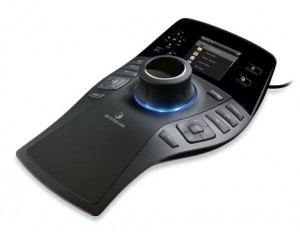
How 3D mice work with LightWave
Specific ways in which LightWave users can take advantage of using a 3D mouse:
Creating 3D models - In LightWave Modeler, a 3D mouse gives artists the freedom to navigate views of models while simultaneously selecting commands and editing models with a traditional mouse.
Navigating views - In LightWave Layout, a 3D mouse gives designers another level of control over 3D scenes and views with three possible modes: walk, fly, and orbit. Whether showcasing scenes or doing an architectural walk-through, a 3D mouse enables users to seamlessly switch perspective views, and seamlessly pan and zoom.
Controlling animations and timelines - In LightWave Layout, 3D mice movements allow designers to select an object, such as a camera, light or bone, and place it within a 3D scene as if they were holding the model in their hand. Additionally, users can effortlessly move back and forth through scene time lines with a simple twist of the 3D mouse cap.
Producing virtual sets - With LightWave's Virtual Studio tool and a 3D mouse, digital artists can create and interact with a virtual 3D set in real time, controlling characters through 3D mouse movements. For example, twisting the 3D mouse cap left or right makes the avatar's head look left or right. For added control, multiple 3Dconnexion 3D mice can be used to manipulate several characters and their traits.
|
|
|
|
|
|
主站蜘蛛池模板:
人人爽人人澡人人人妻|
国产极品精品自在线不卡|
精品久久久久久亚洲中文字幕|
国产伦精品免编号公布|
国产色视频网站免费|
久久av高潮av喷水av无码|
国产免费av网站|
狠狠躁无码一区二区|
亚洲欧美综合|
91丝袜|
欧美色日本|
中文字幕亚洲精品人妻|
中文字幕精品无码一区二区|
无码人妻系列|
色老头亚洲成人免费影院|
色欲色欲久久综合网|
国产白嫩漂亮美女在线观看|
免费观看日本污污ww网站|
国产一区二区不卡视频在线|
亚洲另类专区中文字幕|
柳州莫菁在线一区二区三区|
日韩国产精品一本一区馆/在线|
67194熟妇在线观看线路|
精品熟女视频专区|
四虎影成人精品a片|
日本国产一区二区三区|
亚洲精品毛片久久久久久久
|
亚洲一区精品视频在线|
视频一区视频二区亚洲免费观看|
超碰热|
久久综合九色综合狠狠97|
国产精品无码素人福利不卡|
亚洲一级网此|
亚洲国产欧美一区二区好看电影|
国产不卡一区二区四区|
日日摸天天爽天天爽视频|
国产精品一亚洲AV日韩AV欧|
亚洲成人资源|
久久美女夜夜骚骚免费视频|
欧美538顶级|
后入内射欧美99二区视频|